
Nembol vs Sellbrite: Which Multichannel Listing Tool Is Right for You?
Both Nembol and Sellbrite help e-commerce sellers list products and sync inventory across multiple marketplaces. But they differ in pricing model, channel coverage, and the extra tools they offer. Here’s how they compare in 2026.
10 min read • Last update August 5, 2026

The quick verdict
Choose Nembol if you want a complete multichannel commerce platform with unlimited orders, centralized product, order, customer, and promotion management, social selling capabilities, a built-in ecommerce website, and flexible support for multiple marketplaces and sales channels. Nembol supports major ecommerce platforms and marketplaces while also covering additional channels such as TikTok Shop, OnBuy, Square, and Squarespace that are not available in Sellbrite. Features like Nembol Checkup, Nembol Link, bidirectional channel sync, automated pricing rules, catalog backup, and Storefront provide greater control over your catalog and sales operations, while product-based pricing and customer support on every plan keep costs predictable.
Choose Sellbrite if you need built-in shipping labels, multi-warehouse inventory management, Walmart or Newegg integrations, unlimited multi-user access, or a free plan for very low-volume selling (up to 30 orders/month).
What Is Nembol?
Nembol is a multichannel ecommerce management platform designed for small and medium-sized businesses, independent sellers, and agencies. It helps merchants manage products, orders, customers, and promotions across multiple marketplaces, ecommerce stores, and social channels while keeping inventory synchronized across all connected sales channels.
Unlike traditional listing tools, Nembol focuses on product data control and multichannel flexibility. It includes features such as bidirectional channel sync, social commerce support, Storefront (its built-in ecommerce website), centralized order and customer management, and catalog quality monitoring through Nembol Checkup. Nembol is one of the few multichannel platforms that actively monitors catalog quality, identifying missing attributes, duplicate SKUs, and incomplete product information before listings are published.
Nembol is particularly suited for sellers who want to manage every aspect of their multichannel business from a centralized platform while maintaining accurate, consistent product data across every sales channel.
What Is Sellbrite?
Sellbrite is a multichannel listing and inventory management platform owned by GoDaddy, focused primarily on marketplace sellers, especially those operating in the US. It allows merchants to create and manage listings across major marketplaces and ecommerce platforms while synchronizing inventory and orders.
Sellbrite differentiates itself through marketplace-focused tools such as built-in shipping label creation, multi-warehouse inventory management, Walmart and Newegg integrations, unlimited user access, and API availability.
It is best suited for sellers who prioritize marketplace operations, fulfillment workflows, and logistics management.
Supported sales channels
Channel availability is often the deciding factor when choosing a multichannel platform. While both tools support major marketplaces like Amazon, eBay, Etsy, Shopify, and WooCommerce, they differ significantly in social commerce, regional marketplaces, and US marketplace coverage.
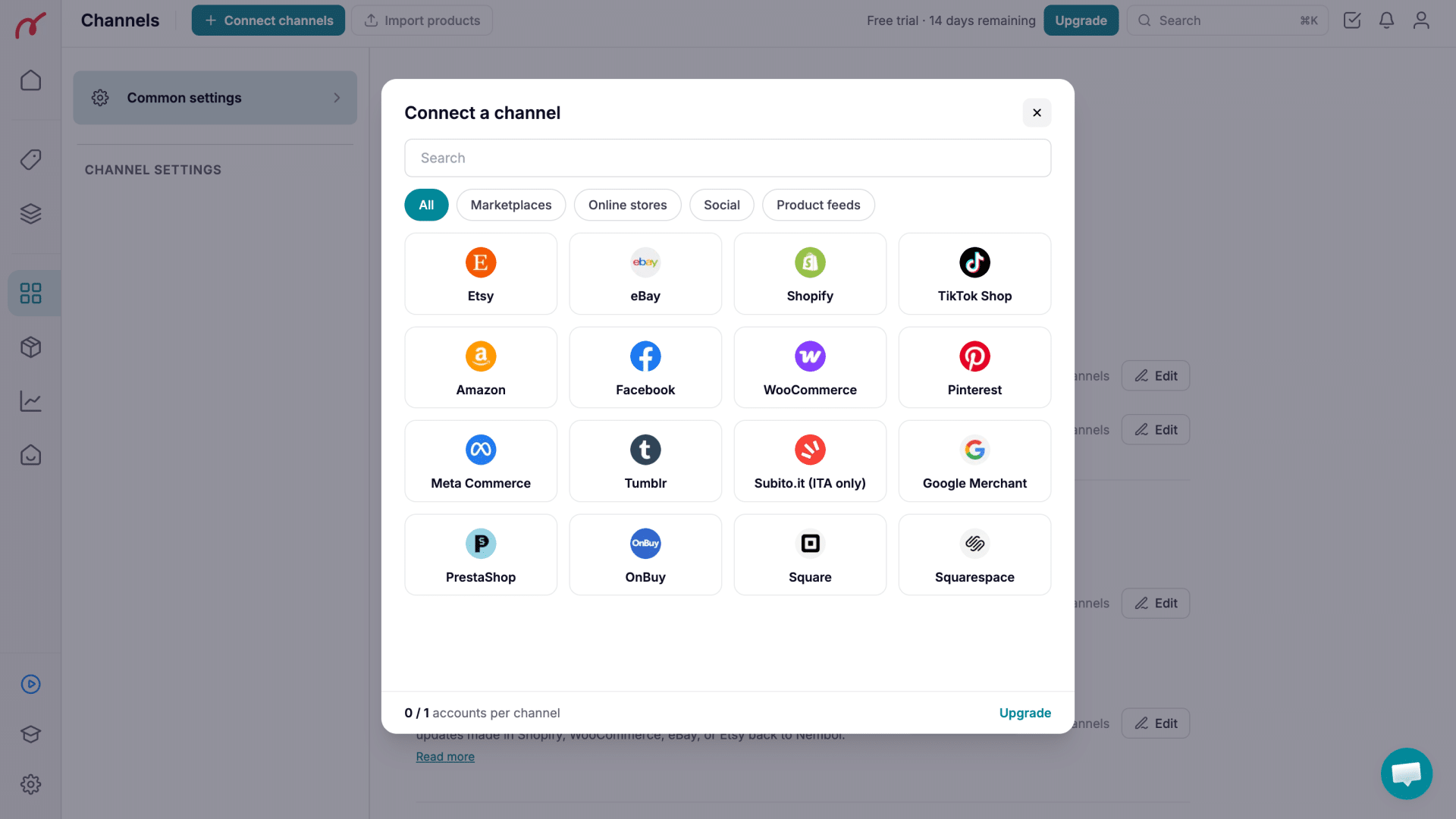
Nembol Supported Channels
Nembol is built for sellers who want to expand beyond traditional marketplaces into social selling and a broader mix of ecommerce channels. It supports:
- Amazon
- eBay
- Etsy
- Shopify
- WooCommerce
- TikTok Shop
- Square
- Squarespace
- Google Merchant Center
- OnBuy
- PrestaShop
- Subito.it
- Meta Commerce (Facebook Shops / Instagram Shopping)
- Tumblr
Nembol’s broader channel coverage makes it particularly suitable for sellers combining marketplaces, ecommerce stores, and social commerce. It is especially relevant for European sellers and brands looking to diversify their sales channels beyond Amazon and eBay.
Sellbrite Supported Channels
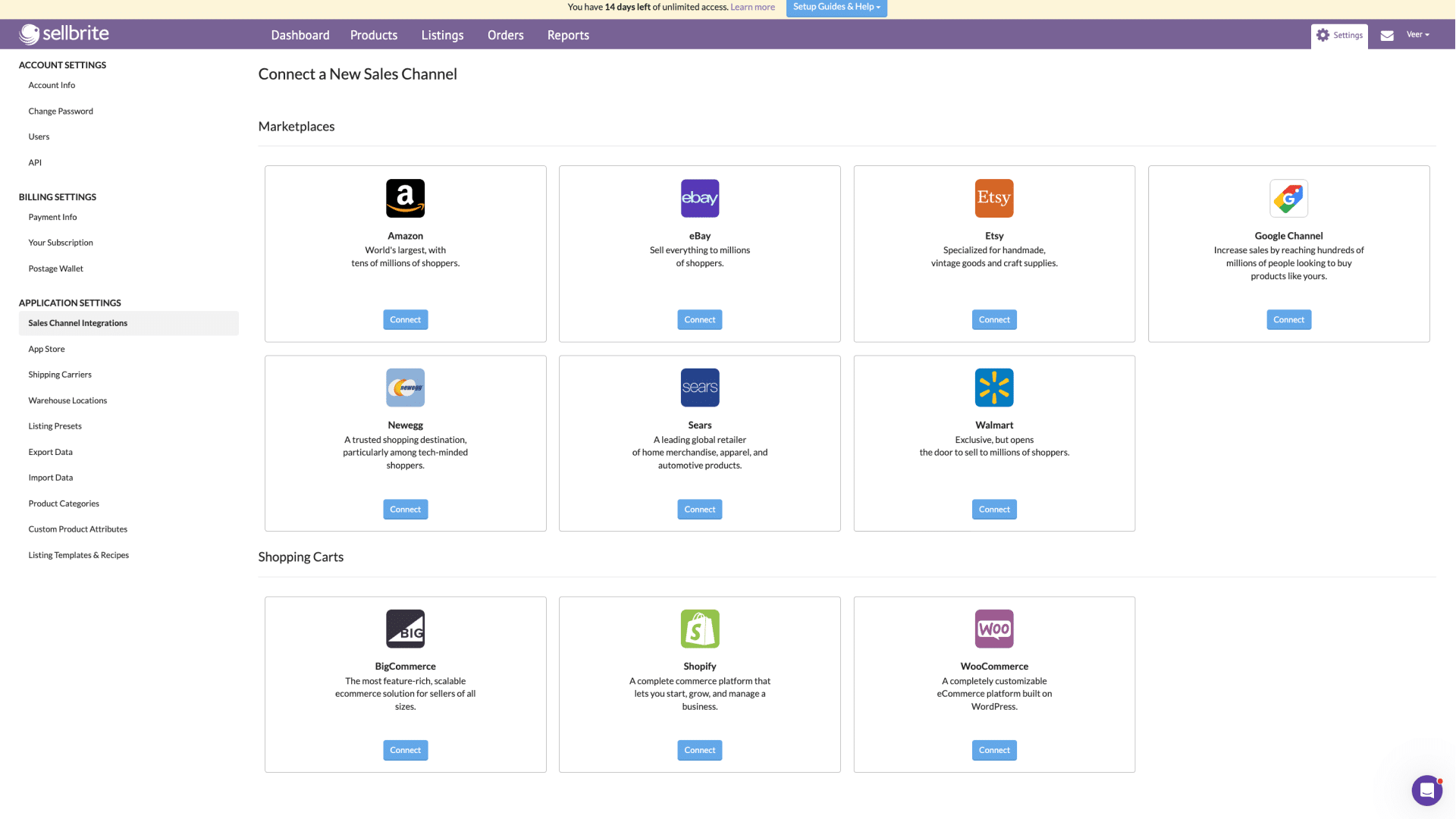
Sellbrite focuses primarily on established marketplaces and ecommerce platforms, with stronger coverage for US-based sellers. Supported channels include:
- Amazon
- eBay
- Etsy
- Walmart
- Newegg
- Sears
- Shopify
- WooCommerce
- BigCommerce
Sellbrite’s channel selection is narrower than Nembol’s for social commerce and international marketplaces, but it has an advantage for sellers focused on Walmart, Newegg, and traditional US marketplace operations.
Onboarding, User Interface & Overall Experience
Getting started is straightforward with both platforms, but they take noticeably different approaches to user experience, daily workflows, and operational flexibility.
Onboarding
Both Sellbrite and Nembol provide a smooth onboarding experience. Sellers can either set up their accounts independently using self-service guides or schedule onboarding calls for personalized assistance. Each platform also maintains a comprehensive Help Center, and a collection of video tutorials, making it easier for users who prefer step-by-step visual guidance.
The main difference is in how new users are guided through the initial setup.
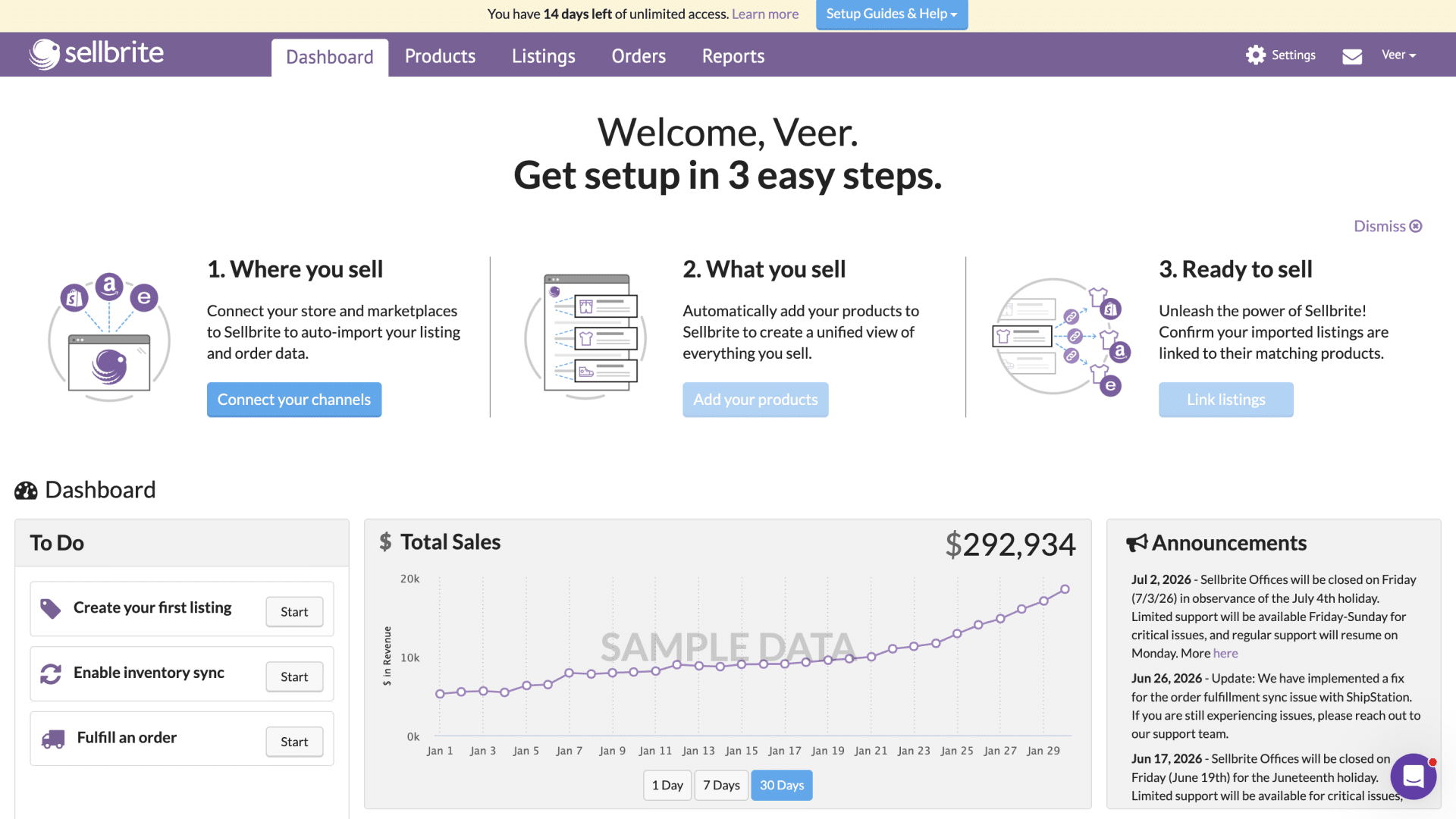
Sellbrite keeps onboarding simple with a single setup flow for all users, regardless of their business model or goals.
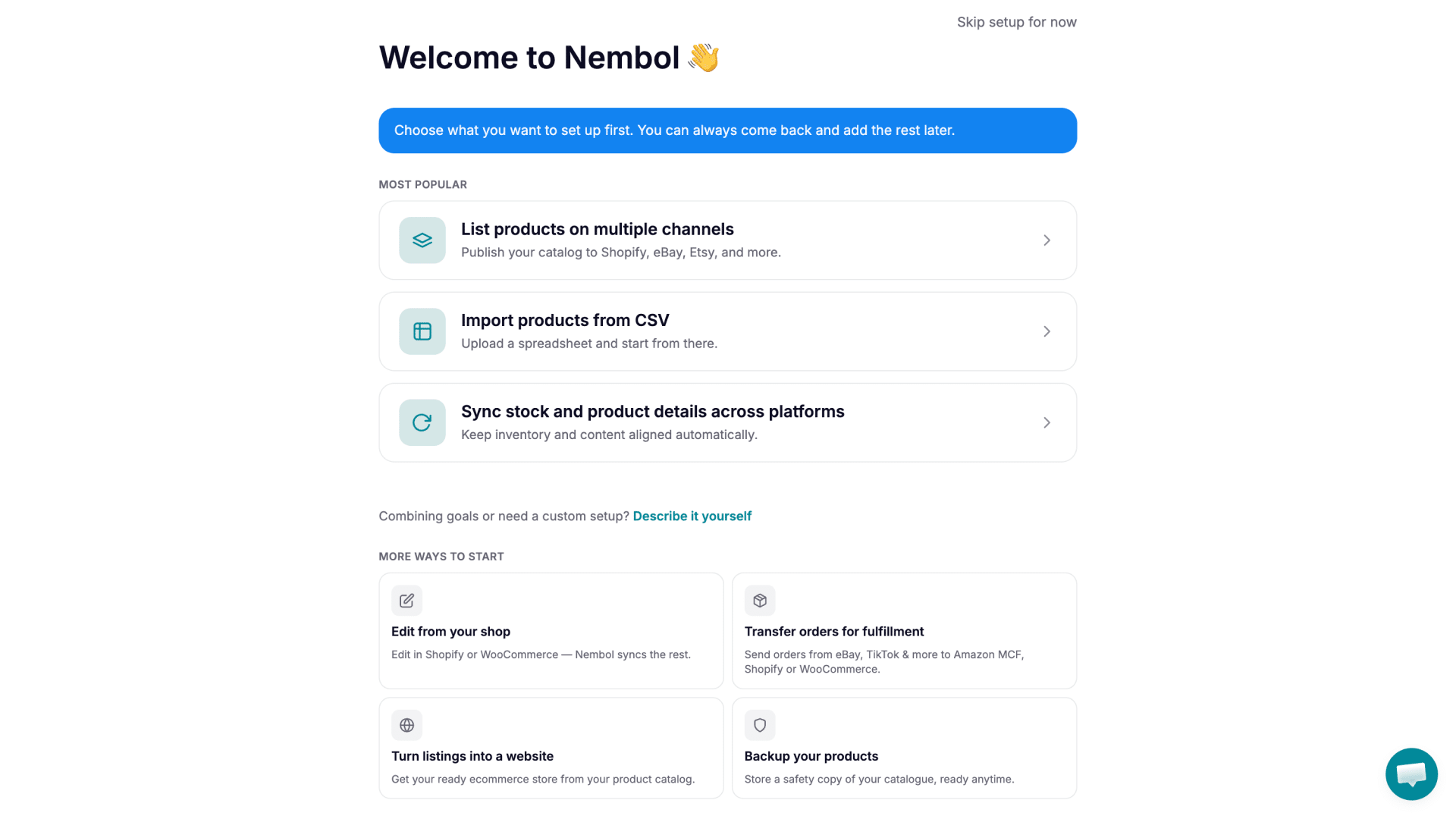
Nembol, on the other hand, offers multiple preconfigured onboarding paths tailored to different workflows, helping sellers configure the platform based on how they plan to sell. This more personalized approach can reduce setup time and make it easier for users to get the platform configured correctly from the start.
User Interface (UI) & User Experience (UX)
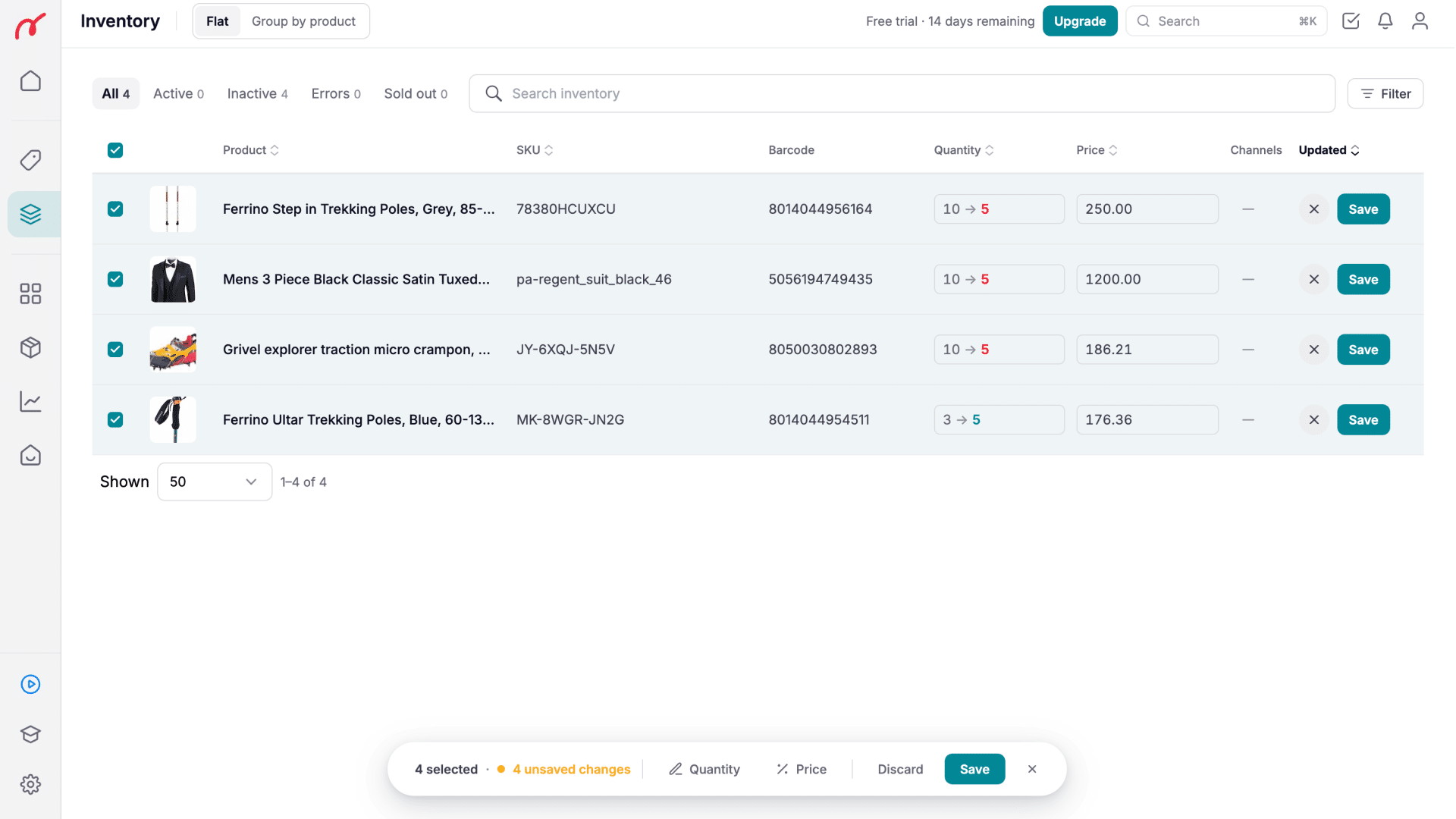
Sellbrite’s interface is clean and beginner-friendly. New users can quickly find the main features without feeling overwhelmed, making it a good option for merchants new to multichannel selling. However, the design feels dated. While the interface is simple, it lacks some of the polish and efficiency found in newer e-commerce software.
Nembol features a modern, lightweight interface with a clean visual design. Menus are well organized, workflows are intuitive, and the platform feels carefully designed for everyday use. Whether editing products, connecting sales channels, or reviewing inventory, navigation is straightforward and requires minimal clicks.
Catalog Management & Editing Tools
The biggest difference between the two platforms appears during day-to-day operations.
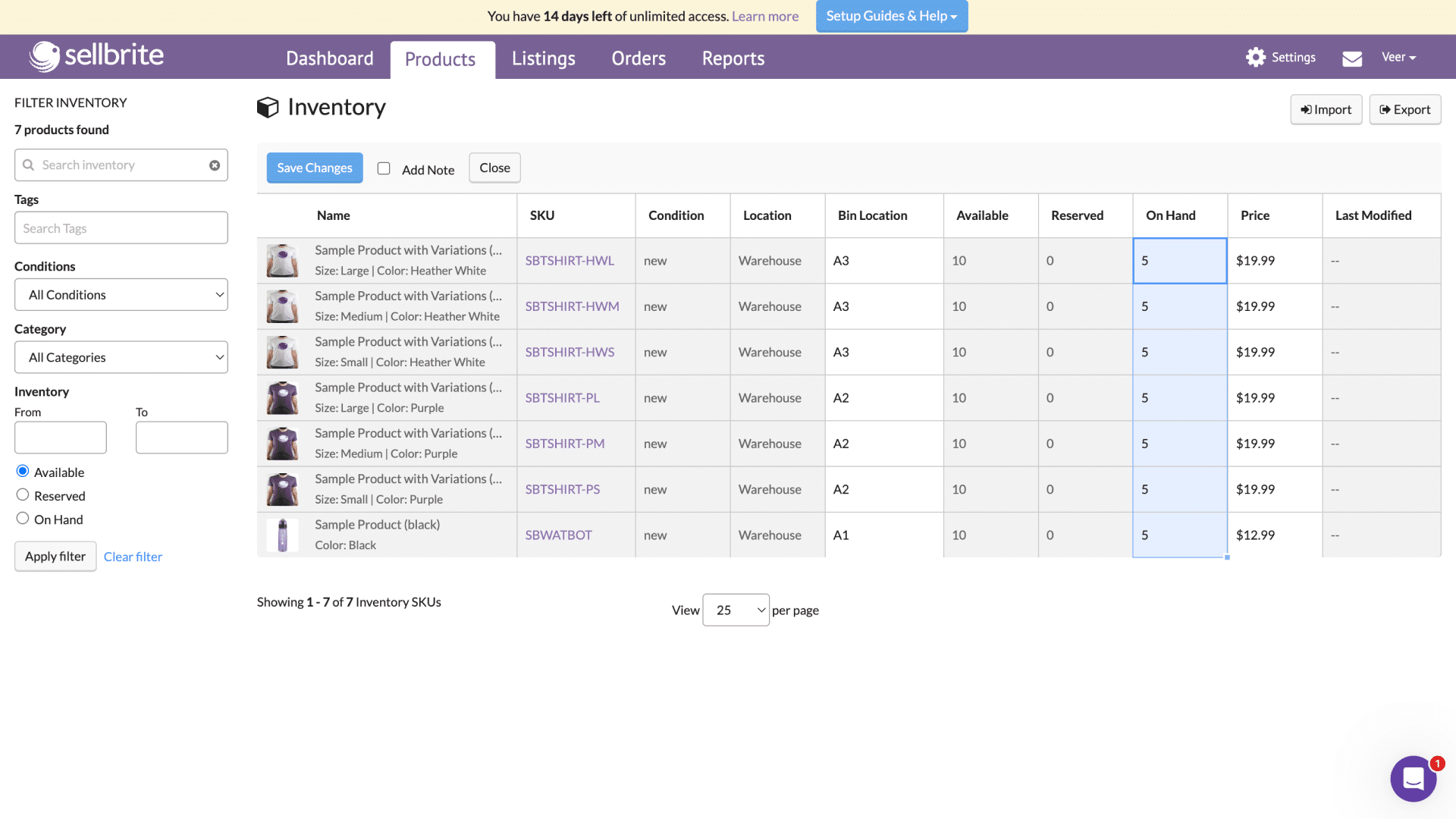
Sellbrite offers only basic editing capabilities, which are sufficient for smaller catalogs but can become limiting as inventory grows. Bulk editing and product management workflows are relatively simple, meaning repetitive tasks may require additional manual effort.
Nembol provides more advanced catalog management tools that make maintaining large inventories considerably easier. Product editing, synchronization, and bulk updates are more flexible, allowing sellers to manage multiple channels from a centralized catalog with less manual work.
Analytics & Reporting
Sellbrite includes standard reporting tools that cover basic sales and inventory metrics. However, its analytics are relatively limited, offering no comparison views or advanced channel-specific reporting capabilities. While sufficient for monitoring day-to-day activity, businesses selling across multiple marketplaces may find it difficult to compare channel performance or identify broader sales trends.
Nembol provides a more comprehensive analytics experience. It includes comparison views and more detailed reporting that allow sellers to evaluate performance across different marketplaces, ecommerce stores, and sales channels. This makes it better suited for multichannel businesses that need deeper insights into sales performance, inventory trends, and channel-specific metrics to support data-driven decision-making.
Shipping & Fulfillment Integrations
This is the area where Sellbrite has a clear advantage. Its App Store allows merchants to connect a variety of third-party shipping and fulfillment providers, making it a flexible solution for businesses that want to automate shipping with their preferred logistics partners.
Nembol takes a more focused approach. It currently supports order routing to Shopify, WooCommerce, Square, Squarespace and Amazon Multi-Channel Fulfillment (MCF). For many sellers, this is sufficient because additional shipping providers can be connected through Shopify’s or WooCommerce’s own app ecosystems. Nevertheless, businesses looking for a wide range of native shipping integrations will likely find Sellbrite’s ecosystem more comprehensive.
Bottomline
Sellbrite prioritizes simplicity, making it an approachable platform for beginners and merchants who value straightforward workflows. Nembol delivers a more refined and modern experience, with stronger catalog management capabilities and a user interface designed for sellers who regularly manage products across multiple sales channels. The better choice depends on whether you value ease of use above all else or need more efficient tools for managing a growing multichannel business.
Feature-by-Feature Comparison
Data gathered from each product’s public website and documentation as of August 2026.
| Feature | Nembol | Sellbrite |
|---|---|---|
| Listing & Catalog | ||
| Bulk product listing | ||
| Listing templates | ||
| Variation / multi-SKU support | Up to 100 variants | |
| Variant images | Yes | Yes |
| Connect existing listings (link by SKU) | Nembol Link | |
| CSV import / export | Full + light edit | Inventory only |
| AI title generator | ||
| AI description generator | ||
| Product data quality alerts | Nembol Checkup | |
| Catalog backup | Idle Plan ($9.99/mo) | |
| Inventory & Sync | ||
| Real-time inventory sync | Every 15 min (paid); every 2h (free) | |
| Bidirectional sync (pull edits from channel) | Shopify/WooCommerce/Square/Squarespace auto; Etsy/eBay ~10 min | Unidirectional only |
| Multi-channel price sync | ||
| Automated pricing rules | Per-channel adjustments | Promotions | Per-channel adjustments |
| Multi-warehouse support | ||
| Amazon MCF / FBA integration | Amazon MCF | FBA +$19/mo add-on |
| Orders & Fulfillment | ||
| Consolidated order dashboard | Via fulfillment transfer | Native |
| Order transfer to fulfillment platform | Shopify, WooCommerce, Square, Squarespace, Amazon MCF | Native + FBA routing |
| Shipping label printing | USPS, UPS, FedEx | |
| Tracking number management | Yes | Automatic | Mark order as shipped | Yes | Yes |
| Channel Coverage | ||
| Amazon | ||
| eBay | ||
| Etsy | ||
| Shopify | ||
| WooCommerce | ||
| TikTok Shop | ||
| OnBuy | ||
| Meta Commerce (Facebook/Instagram Shops) | ||
| Walmart | ||
| Newegg | ||
| BigCommerce | ||
| PrestaShop | ||
| Google Merchant Center | ||
| Subito.it | ||
| Additional Features | ||
| Social media auto-posting | ||
| Ecommerce website | Nembol Storefront | Customers management |
| Multi-account per channel | 1–10 (plan-dependent) | Multiple stores |
| Multi-user seats | 1–5 (plan-dependent) | Unlimited |
| Customer support | All plans | Paid plans only |
| Public API | Yes (After approval) | |
| Mobile app | Web only | Web only |
Pricing comparison
The two platforms use fundamentally different pricing models. Nembol charges based on the number of products in your catalog, with unlimited orders on every plan. Sellbrite charges based on the number of orders per month, with unlimited products and users on every plan.
Nembol pricing (by product count, unlimited orders)
| Plan | Products | Seats | Accounts / Channel | Key Features Included | Price / Month |
|---|---|---|---|---|---|
| Basic | 200 | 1 | 1 | Inventory sync, Storefront, Social Posting | $39 |
| Pro | 2,000 | 1 | 2 | Nembol Link + Transfer Orders | $49 |
| Enterprise | 5,000 | 2 | 4 | Attributes Manager + Nembol Checkup | $79 |
| Enterprise+ | 15,000 | 5 | 10 | Nembol Checkup + AI Title & Description + API access (After approval) | $129 |
All plans include unlimited listings, orders, and variants, with Nembol Storefront available on all paid plans. Annual billing saves 25%. The Idle Plan (catalog backup only, no active sync) is available at $9.99/mo.
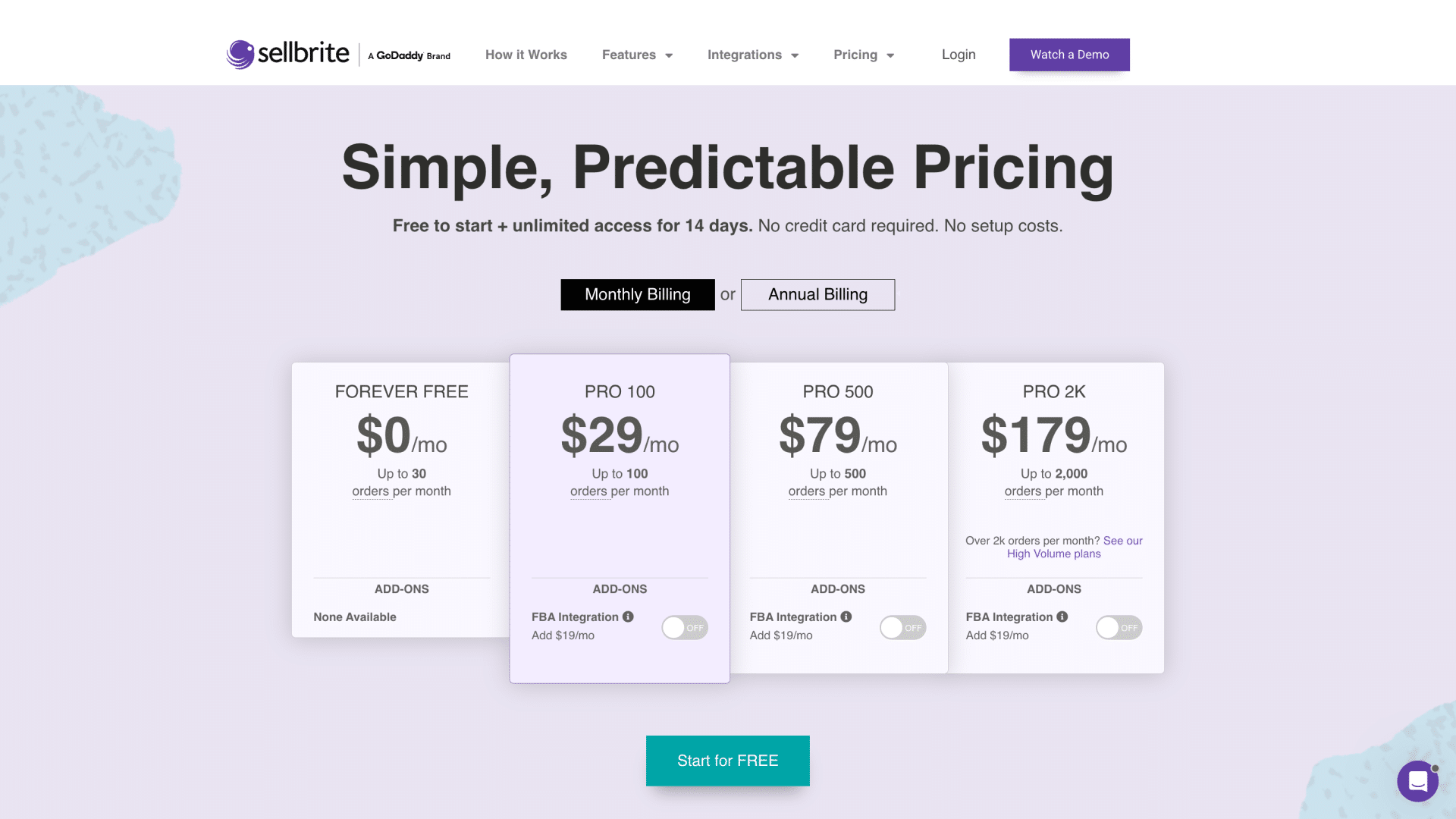
Sellbrite pricing (by order count, unlimited products and users)
| Plan | Orders / Month | Sync Frequency | Support | Price / Month |
|---|---|---|---|---|
| Free | 30 | Every 2 hours | ✘ None | $0 |
| Pro 100 | 100 | Every 15 min | ✔ Email, Chat, Phone | $29 |
| Pro 500 | 500 | Every 15 min | ✔ Email, Chat, Phone | $79 |
| Pro 2K | 2,000 | Every 15 min | ✔ Email, Chat, Phone | $179 |
FBA Inventory & Multi-Channel Fulfillment: +$19/mo add-on on all paid plans.
Note on the Free plan: Sellbrite’s Free plan syncs inventory only every 2 hours and provides no customer support. This can create overselling risk on active listings and leaves you without help if issues arise.
Which pricing model works better for you?
A seller with 2,000 products and 200 orders/month would pay $49/month on Nembol; on Sellbrite that volume requires the Pro 500 plan at $79/month.
If you have a large catalog (1,000+ SKUs) with moderate order volume, Nembol’s product-based pricing is more cost-predictable — a strong sales month never increases your bill.
Sellbrite’s model works better for sellers with small catalogs and very high order volumes, or for those just starting out who want a zero-cost entry point.
Keep in mind the Free plan’s sync delay and lack of support when evaluating it for anything beyond minimal activity.
Strengths and Weaknesses
Nembol: Strengths
- Unlimited orders, listings, and variants on every plan — no per-order fees
- Bidirectional channel sync: edit on Shopify, WooCommerce, Etsy, Square, Squarespace or eBay and pull changes back into Nembol automatically
- Social media publishing across Pinterest, Facebook pages, Instagram, and Tumblr
- Storefront: built-in ecommerce website with branded pages, checkout, payments, shipping options, promotions, bundles, and analytics — available on all paid plans
- Nembol Checkup: catalog quality diagnostics, unique to Nembol
- Unified customer management across connected channels, with customer search and CSV export capabilities
- Transfer orders to Shopify, WooCommerce, Square, Squarespace or Amazon MCF for fulfillment
- Centralized promotions management to create and schedule discounts across sales channels
- Multi-account support (for users with multiple Etsy, eBay, Amazon accounts)
- Automated pricing rules per channel
- European marketplace support (PrestaShop, Subito.it, OnBuy)
- Customer support on all plans
- Catalog backup via Idle Plan ($9.99/mo) — protect your data against account suspensions or marketplace policy changes
Nembol: Weaknesses
- No built-in shipping labels
- No multi-warehouse inventory tracking
- No Walmart, Newegg, BigCommerce integration
- Customer support limited to European business hours
Sellbrite: Strengths
- Free plan for low-volume sellers (30 orders/mo)
- Built-in shipping labels (USPS, UPS, FedEx) and native order management
- Multi-warehouse inventory management with selective stock push
- Walmart and Newegg integrations (US-focused)
- Amazon FBA inventory & multi-channel fulfillment (paid add-on)
- Public API for custom integrations
- Unlimited users on all plans (including Free)
- Backed by GoDaddy (enterprise stability)
Sellbrite: Weaknesses
- Sellbrite uses a unidirectional synchronization model — edits made directly on a sales channel are not pulled back into Sellbrite
- No catalog backup feature
- No TikTok Shop, Square, Squarespace, OnBuy, or Meta Commerce integration
- No social media posting capability
- No automated pricing rules
- No website builder
- No catalog quality / data diagnostics tool
- Inventory sync every 2 hours on the Free plan (15 min on paid)
- No customer support on the Free plan
- FBA integration costs an extra $19/month
Who should use Nembol?
Nembol is best suited for businesses, independent sellers, and agencies that need a flexible multichannel selling platform with strong catalog management, social commerce capabilities, and tools to manage their entire sales workflow.
Choose Nembol if you want to sell across a wider range of channels, including marketplaces, ecommerce stores, and social platforms. It is particularly well suited for sellers using TikTok Shop, Square, Google Merchant, Pinterest, Facebook/Instagram Shops, or European platforms such as OnBuy, PrestaShop, and Subito.it — channels that Sellbrite does not support.
Nembol is also a strong choice for businesses that regularly update products across multiple channels and want better control over their catalog data. Its bidirectional sync allows sellers to edit listings directly on supported channels such as Shopify or eBay and automatically keep their central catalog updated. This reduces manual corrections and helps prevent product data inconsistencies across channels.
Beyond catalog management, Nembol helps sellers manage more aspects of their multichannel business from one platform. With Storefront, sellers can turn their existing marketplace listings into a branded ecommerce website and create their own direct sales channel while keeping their product catalog connected to Nembol. Nembol also provides centralized order management, customer management, and promotion tools to help businesses manage sales beyond marketplace listings.
Businesses managing larger catalogs will benefit from Nembol’s product-based pricing model, where costs are based on the number of products rather than order volume. This makes monthly expenses more predictable for sellers with many SKUs but moderate sales volume. Features such as Nembol Checkup, Nembol Link, catalog backup, automated pricing rules, and multi-account support also make it a good fit for brands, agencies, and sellers managing complex inventories.
Agencies and multi-brand operators may also prefer Nembol because higher plans support multiple accounts per channel, allowing teams to manage several storefronts from one platform.
Nembol may not be the best choice for businesses that require built-in shipping label printing, multi-warehouse inventory management, or Walmart and Newegg integrations. Those workflows are areas where Sellbrite has stronger native functionality.
Who should use Sellbrite?
Sellbrite is best suited for US-focused sellers who need straightforward marketplace management combined with built-in shipping and fulfillment tools.
Choose Sellbrite if your business relies heavily on channels such as Walmart or Newegg, requires multi-warehouse inventory management, or wants native shipping workflows without connecting additional platforms. Its built-in shipping label creation, FBA multi-channel fulfillment support, and warehouse features make it a strong option for sellers with established logistics operations.
Sellbrite is also a good fit for larger teams that need multiple people managing products, orders, and inventory. Unlike Nembol (with limit to 10 users), Sellbrite offers unlimited users across all plans, making it more suitable for businesses where several team members need access to the platform.
Developers and businesses building custom workflows may also prefer Sellbrite because it provides public API access for custom integrations.
However, Sellbrite is less suitable for sellers focused on social commerce, international marketplace expansion, or advanced catalog control. Its unidirectional sync means edits made directly on marketplaces are not automatically pulled back into Sellbrite, and it lacks features such as catalog backup, product data quality monitoring, automated pricing rules, and social media publishing. The Free plan is useful for very small sellers, but the 2-hour inventory sync interval and lack of customer support make it less practical for businesses with active sales volume.
Frequently Asked Questions
Which Platform Has Better Channel Coverage: Nembol or Sellbrite?
The better option depends on where you sell.
- Choose Nembol if you want to combine marketplaces with social commerce, need TikTok Shop or OnBuy support, or sell across European platforms.
- Choose Sellbrite if your business is primarily focused on US marketplaces such as Walmart and Newegg, or if you need deeper integration with traditional marketplace workflows.
For sellers looking to expand into new channels over time, Nembol offers broader diversification. For sellers with a US marketplace-first strategy, Sellbrite provides stronger coverage in specific high-volume channels.
What is the main difference between Nembol and Sellbrite?
The main difference is their approach to multichannel selling. Nembol focuses on managing and improving product data across multiple channels, with features such as bidirectional sync, promotions, customers management catalog quality checks, social media publishing, and catalog backup. Sellbrite focuses more on marketplace operations, offering tools such as shipping label creation, warehouse management, and fulfillment integrations.
Which platform is better for large product catalogs?
Nembol may be a better fit for sellers managing large catalogs with moderate order volumes because its pricing is based on product count rather than orders. It also provides catalog management tools such as Nembol Checkup, which helps identify missing product data, duplicate SKUs, and listing issues.
Sellbrite may be better for sellers with smaller catalogs but high order volumes because it charges based on monthly orders and allows unlimited products.
Start your free trial with Nembol
Connect both platforms with Nembol and keep your products, inventory, and sales in sync.
14-day free trial | No credit card required