


Overview
Selling on Amazon can be highly rewarding, giving businesses access to millions of potential customers worldwide. However, understanding how to sell on Amazon successfully requires more than simply listing products. Real results come from careful planning, strict adherence to Amazon’s rules, and continuous optimization across every part of your operations.
Whether you are a newcomer learning how to sell on Amazon or an experienced seller refining your strategy, building a strong foundation and maintaining operational discipline are essential for sustainable growth and long-term success on the platform.
Tip 1: Set up a compliant Amazon account
If you’re new to Amazon, the first rule is simple: follow Amazon’s rules.
You’re a guest on their marketplace. Break the rules, and your account can be shut down before you even start. Avoiding bans and restrictions must be your top priority.
Pricing, promotions, and marketing can wait. A properly set up, compliant account is the foundation of successful selling on Amazon—nothing else works without it.
What are the two types of Amazon seller accounts?
Amazon offers two main types of seller accounts:
- Individual — Best for beginners or sellers with a small catalog. No monthly subscription, but a per-item selling fee applies.
- Professional — Ideal for businesses planning to scale. Includes advanced tools, reporting, and access to promotional features. Monthly subscription fee applies, cost-effective for higher volumes.

How to do identity verification on Amazon?
Once your seller account is selected, Amazon requires multi-step verification to ensure trust and security for buyers and sellers:
- Identity Verification: Upload a valid government-issued ID such as a passport or national ID card.
- Address Verification: Provide a recent document (within 180 days) showing your full address, such as a utility bill or bank statement.
- Bank Account Verification: Confirm that your bank account details match those provided during registration.
- Business Verification: Depending on your business type, submit documents such as business licenses or certificates of incorporation.
How do I complete the Tax Interview?
Amazon requires sellers to provide accurate tax information to comply with local and international regulations:
- Enter all required tax information, such as VAT numbers for EU sellers or TIN/EIN for US sellers
- Amazon may request verification of tax details at any time
- Failure to provide accurate tax information can lead to account limitations or suspension.
What is product compliance in Amazon
Even with a fully verified account, Amazon requires that all products sold meet legal and safety standards for the marketplaces in which you operate:
- Ensure products have necessary certifications (e.g., CE marking for the EU)
- Verify accurate labeling, packaging, and safety instructions
- Submit any requested documentation via Amazon’s Manage Your Compliance dashboard.
Non-compliance can lead to:
- Product removal from the catalog
- Inventory being held at fulfillment centers
- Blocked shipments at customs.
Tip 2: Choose and optimize your product offer
After setting up a compliant Amazon account, the next step is to make sure your products are both well-chosen and well-presented.
Success on Amazon isn’t just about listing items, it’s about picking products that sell and presenting them in a way that convinces buyers to click “Buy now.”
Even experienced sellers should regularly evaluate their portfolios, while new sellers must carefully select their first products.
Amazon highlights three key factors that affect your product’s performance:
- Demand
- Competition
- Margins
Monitoring these ensures your products are relevant, competitive, and profitable.
Equally important is optimizing your listings. A great product alone isn’t enough, images, titles, descriptions, bullet points, and pricing all play a crucial role in attracting customers and converting views into sales.
Read more: How to optimize your listings on Amazon
How do I decide what products to sell on Amazon?
If you’re new and haven’t sold any products yet, you can assess demand and competition by analyzing similar listings in your target category.
Look at pricing, customer reviews, product presentation, and Best Seller rankings to identify what is currently popular with buyers. This research helps you select products that are likely to attract attention once listed.
For sellers with active listings, Amazon provides detailed performance data inside Seller Central.
Through Business Reports (Reports → Business Reports), you can monitor key performance metrics such as units ordered, sales, page views, sessions, and Buy Box percentage. See the image below for how to access this section.

The reports include dashboards like Sales Dashboard, Business Reports by Date, as well as Sales and Traffic reports such as Detail Page Sales and Traffic by ASIN, by Parent Item, or by Child Item, and Sales and Orders by Month.
These insights help you track product performance, identify trends, and make informed decisions about which items to prioritize, optimize, or expand in your catalog.
Profitability should also be reviewed continuously. In the Payments section you can analyze fees, fulfillment costs, and net proceeds to ensure your products generate sustainable margins.
Regularly combining these insights with marketplace observation ensures that your product choices remain competitive, relevant, and aligned with your business goals.
How do you get your Amazon listing on top?
Getting your Amazon listing to perform well starts with following Amazon’s product detail page requirements and presenting information clearly for customers.
Each listing should include:
- A descriptive product title
- Detailed bullet points
- High-quality images
- Complete product description
These elements help shoppers quickly understand what the product is, its features, and how it can meet their needs.
The product title should accurately describe the item, without including pricing, promotions, or seller-specific details.
Images are critical: the main image must show the product on a plain white background, while additional images can display multiple angles or uses, always without text overlays or watermarks.
Bullet points and product descriptions should highlight key features and benefits in a clear, concise manner, following Amazon’s content rules. This helps customers compare products easily and understand how to use the item.
For a step‑by‑step guide to structuring titles, choosing images, writing effective bullets and descriptions, and other listing best practices, refer to our in‑depth guide on optimizing listings in 8 easy steps.
Tip 3: Apply competitive pricing strategies
Pricing is one of the most influential factors in Amazon selling. It affects visibility, Buy Box eligibility, and conversion, while also determining the profitability of your business.
A well-thought-out pricing approach balances competitiveness with sustainable margins, ensuring your products remain attractive and compliant with Amazon rules.
Read more: How to win Buy Box in Amazon – Simple steps that work

What is the pricing strategy of Amazon
Amazon’s pricing strategy is focused on helping sellers offer competitive, fair, and customer-friendly prices that support both sales and account health.
Pricing is not arbitrary; it should be based on competitor analysis, cost considerations, and market conditions.
Prices should be competitive enough to stand out but still sustainable for profit. This often means positioning your price at or slightly below the prices of major external retailers, rather than simply minimizing it.
The marketplace monitors pricing internally and externally. If Amazon detects practices such as misleading or significantly inflated prices compared to external sellers, it may remove the Featured Offer, restrict fulfillment, or even limit selling privileges.
Key principles for effective Amazon pricing include:
- Competitive pricing: Position your price at or below key external competitors to increase the likelihood of winning the Featured Offer and attracting customers.
- Flexible strategy: Adjust prices in response to market changes, seasonal demand, and competitor activity.
- Balance margins and demand: Prices that are too low can erode profit, while prices that are too high can reduce sales, finding the right balance is essential.
For sellers managing large catalogs or many SKUs, third-party tools like Nembol appear to be the ideal solution. Nembol allows bulk price updates and automated adjustments based on competitor activity and marketplace trends. It also includes psychological pricing, rounding prices to .99 cents to increase perceived value and appeal to buyers.
This combination helps sellers maintain visibility, maximize Buy Box eligibility, and optimize overall sales performance.
Bulk-adjust prices, launch promotions, and use .99 pricing to boost conversions!
Enjoy a 14-day trial — no credit card required.

Tip 4: Plan your fulfillment strategy
Once you know what products to sell, the next key decision is how your orders will be fulfilled. Your choice of fulfillment method affects delivery speed, customer experience, inventory management, fees, and Buy Box eligibility.
Amazon offers multiple fulfillment options, each with its own advantages and considerations.
Selecting the right one ensures your business can deliver efficiently, maintain high customer satisfaction, and maximize sales while keeping operational costs under control.
Which one is better, FBA or FBM?
Instead of asking which fulfillment option is “better,” focus on which one fits your business. The right choice depends on several key factors:
- Sales volume and demand: Fast-moving products often perform better with FBA due to faster delivery and Prime eligibility, while slower-selling items may be more suitable for FBM.
- Warehouse and logistics capabilities: Evaluate your available storage, packing capacity, and ability to ship orders consistently and on time.
- Customer expectations and delivery speed: Prime eligibility and fast shipping can significantly impact conversion rates and repeat purchases.
- Costs and fees: Compare fulfillment fees, shipping costs, and labor to understand how each option affects your margins.
If you sell a small number of products, FBM can offer greater control over inventory and shipping. If you manage a larger catalog or plan to scale, FBA is often the more efficient choice.
In many cases, sellers with large inventories do not sell exclusively on Amazon, they also receive orders from other channels. Nembol is a tool that integrates with Amazon’s Multi-Channel Fulfillment (MCF) and lets you synchronize orders, automate fulfillment, and maintain consistent stock across multiple platforms.
With Nembol, you can manage large catalogs, reduce manual work, and ensure that both Amazon and external orders (e.g. eBay, Shopify and WooCommerce) are processed efficiently.
Focusing on these factors ensures your fulfillment strategy aligns with your business goals, optimizes operations, and maintains high customer satisfaction, rather than simply choosing between FBA and FBM.
Tip 5: Monitor customer and seller feedback
Long-term growth depends on understanding customer expectations, responding effectively to feedback, and maintaining a strong account health status.
Both product feedback (customer reviews and ratings) and seller performance metrics play a crucial role in determining your visibility, credibility, and eligibility to sell. Regular monitoring allows sellers to detect potential issues early, take corrective action, and ensure compliance with Amazon’s rules.
Does Amazon listen to customer feedback?
Yes. Amazon actively tracks customer feedback to assess product quality and buyer satisfaction. This is done through programs such as Voice of the Customer, which aggregates data at the ASIN level.
Signals include:
- Product reviews and ratings
- Return reasons and patterns
- Customer questions and comments
- Refunds and complaints
These insights allow Amazon to evaluate whether products consistently meet buyer expectations. If a product has recurring complaints, high return rates, or safety issues, Amazon may:
- Reduce its visibility in search results
- Limit eligibility for the Buy Box
- Temporarily or permanently suppress the listing.
For sellers, monitoring these trends in Seller Central is essential. Addressing customer feedback might involve improving product quality, updating descriptions for clarity, enhancing packaging, or providing clearer instructions. Acting on this feedback helps prevent performance issues from escalating and strengthens your credibility with buyers.
Does seller feedback matter on Amazon?
Seller feedback focuses on the buying experience rather than the product itself, evaluating the seller’s reliability in order fulfillment and service.
This feedback directly affects Account Health and is part of Amazon’s performance evaluation system. Key metrics include:
- Order Defect Rate (ODR): Measures overall service quality, incorporating negative feedback, A-to-z Guarantee claims, and chargebacks. Amazon recommends keeping ODR below 1%.
- Late Shipment Rate: Tracks orders shipped after the expected date; the recommended target is under 4%.
- Pre-fulfillment Cancellation Rate: Measures orders cancelled by the seller before shipping; target under 2.5%.
- Valid Tracking Rate: Ensures shipments have tracking information; recommended over 95%.
- On-Time Delivery Rate: Monitors delivery performance for seller-fulfilled orders; target over 90%.
Failing to maintain these metrics can trigger account warnings, limited selling privileges, or even suspension. Maintaining excellent seller performance not only protects your account but also contributes to higher visibility, eligibility for the Buy Box, and trust with customers.
Sellers should:
- Respond promptly to buyer messages through Buyer-Seller Messaging, ideally within 24 hours.
- Track trends in seller feedback and product reviews to spot systemic issues early.
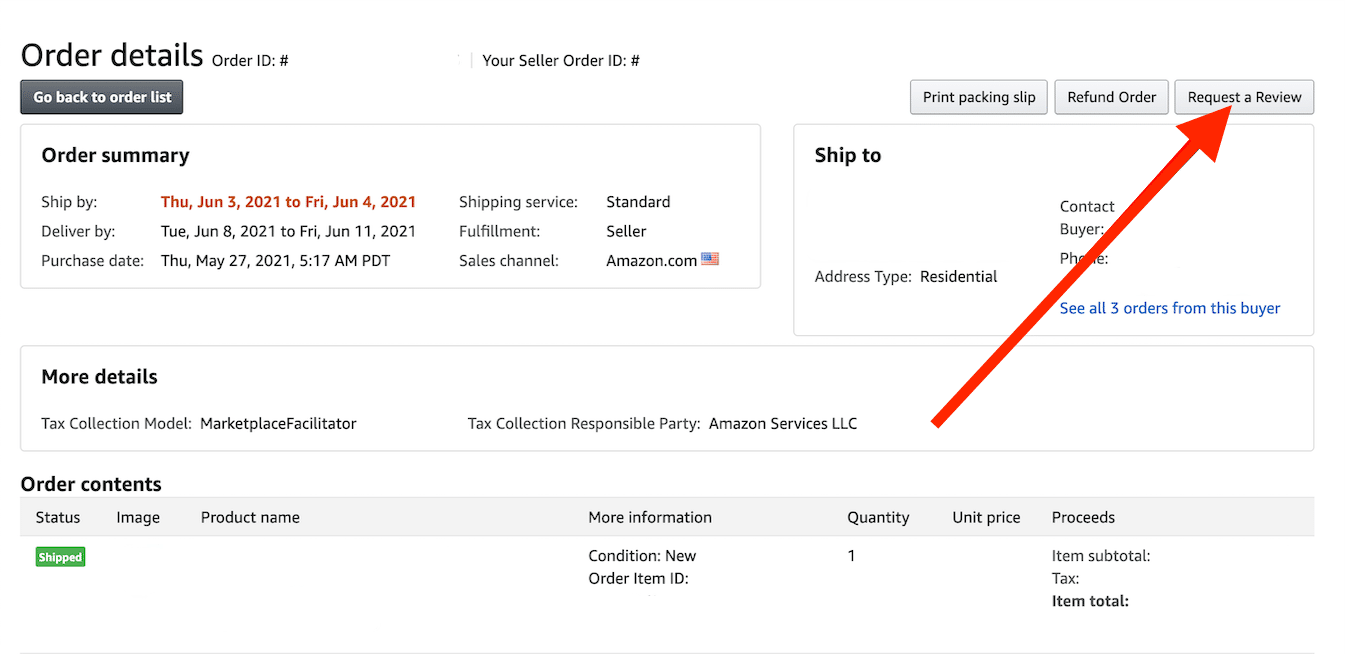
- Follow Amazon’s Customer Reviews and Seller Feedback Policies, avoiding review manipulation or incentivization.
- Use feedback insights to improve operations, packaging, shipping processes, and customer service workflows.
By actively monitoring both customer reviews and seller feedback, sellers can anticipate problems before they impact account health, enhance customer satisfaction, and encourage repeat business, all critical for sustainable success on Amazon.