


What is listing optimization in Amazon
Listing optimization is the process of improving your product listing to make it more visible, appealing, and likely to convert on Amazon.
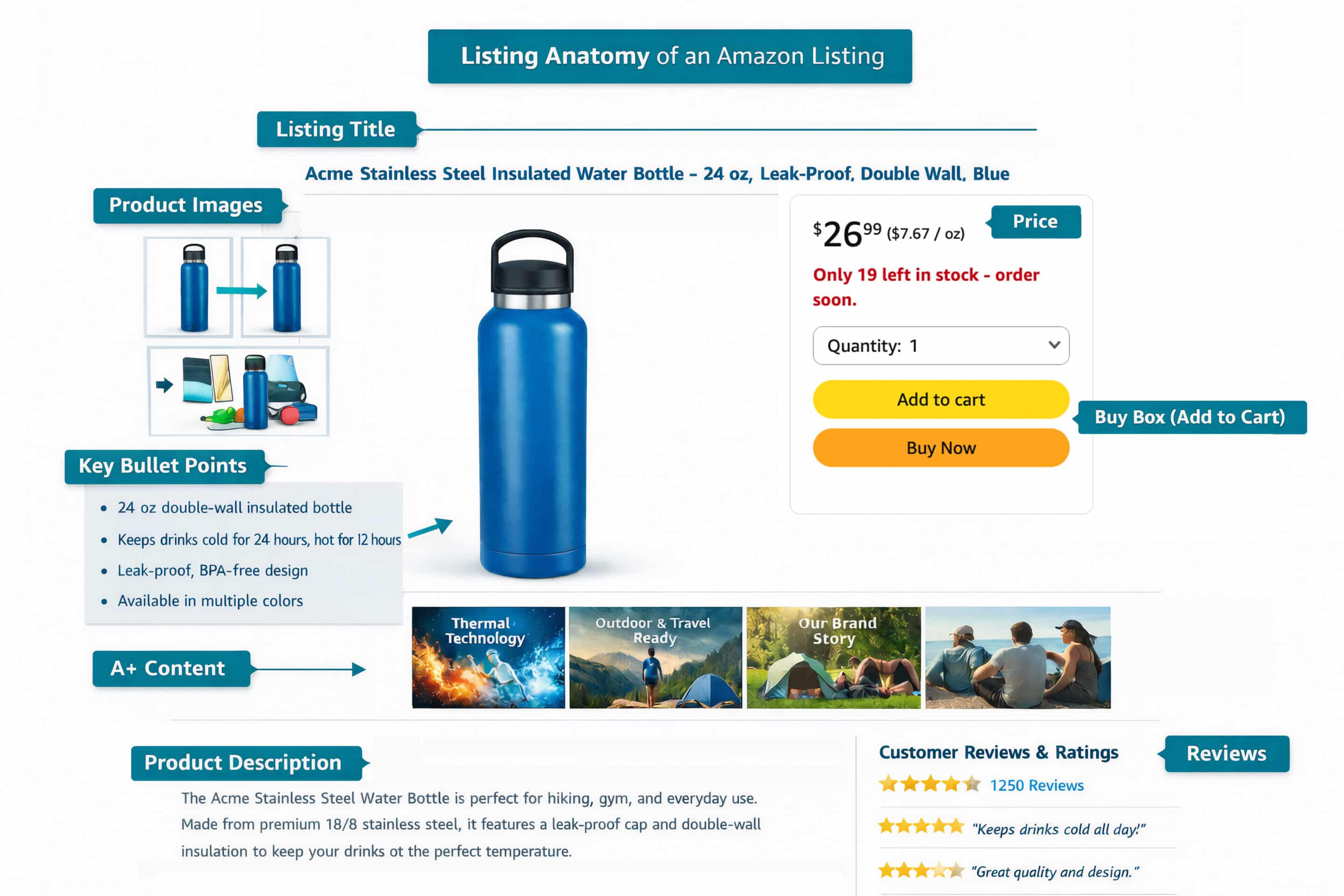
In practice, this means ensuring that every element of your listing is strategically designed to meet Amazon’s standards and satisfy buyer expectations, such as:
- Title
- Description
- Images
- A+ Content
- Pricing
- Reviews
- Variations
See the picture below for the anatomy of an Amazon listing.
Amazon is an incredibly competitive marketplace, with millions of sellers competing for the attention of the same buyers. In such an environment, even a high-quality product can struggle to stand out if its listing is poorly optimized. A well-optimized listing not only helps your product rank higher in search results, but also captures attention, communicates value clearly, and increases the likelihood of conversion.
Essentially, listing optimization is the difference between a product that remains invisible among competitors and one that consistently reaches and persuades the right buyers.
How listing optimization impacts sales
A well-optimized listing actively drives performance.
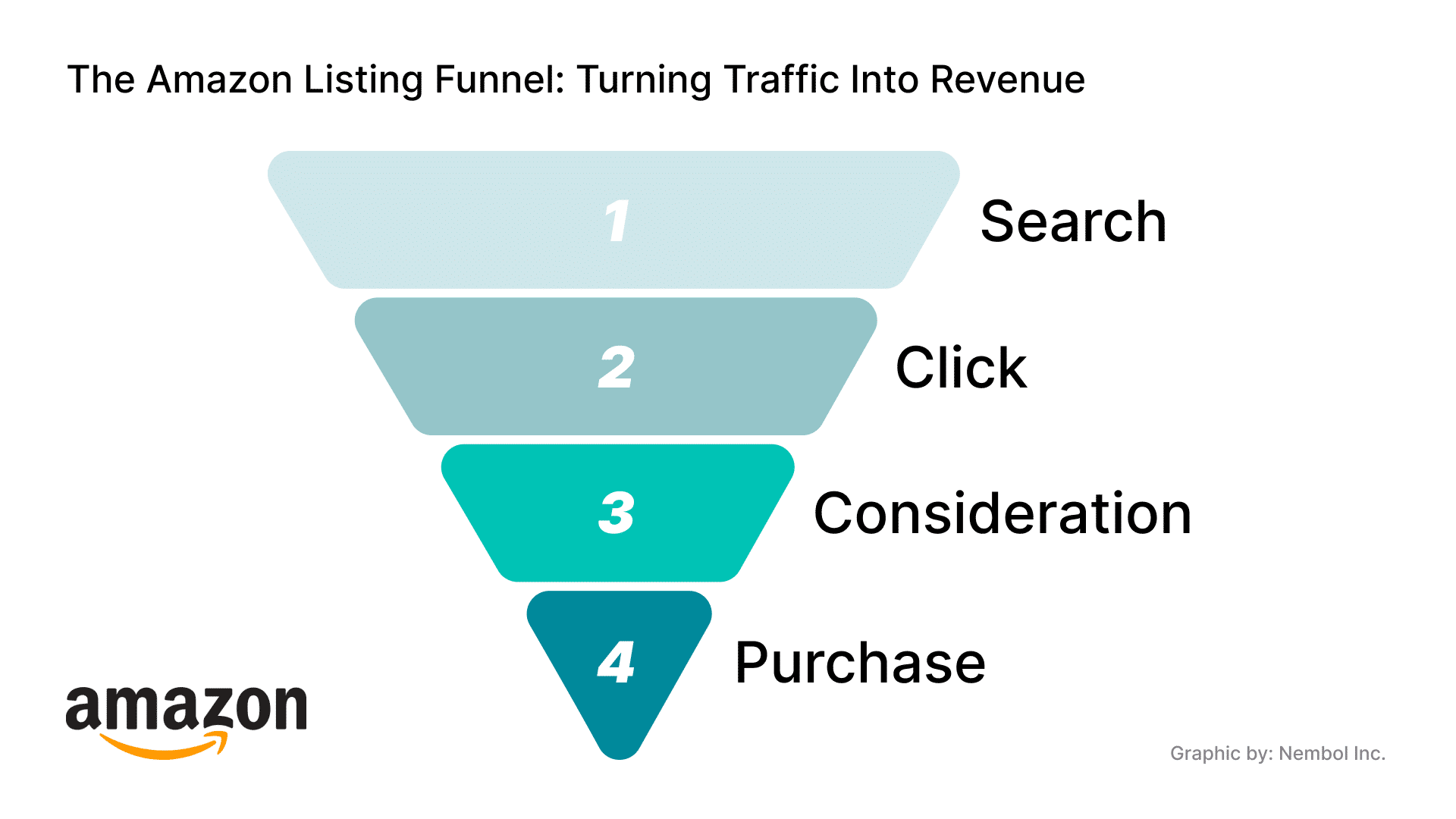
Listings that are clear, well-structured, and aligned with buyer expectations tend to generate higher click-through rates, because shoppers immediately understand what the product offers and why it matters.
High-quality images, detailed descriptions, and persuasive titles help buyers quickly recognize the benefits, reducing indecision and increasing the likelihood of purchase.
Optimization also influences conversion beyond the initial click.
Pricing that reflects value, informative A+ Content, and visible positive reviews reassure customers, building confidence and trust in the product. Over time, this not only boosts sales but can improve your ranking in search results, creating a cycle where better visibility leads to more clicks, more conversions, and even higher overall sales.
Effective listing optimization ensures that a product stands out in a crowded marketplace, engages buyers effectively, and consistently drives revenue growth over time.
How do you optimize your listing on Amazon
Optimizing a listing on Amazon involves carefully shaping every aspect of how your product is presented. From the title and description to images and pricing, each element contributes to how your product is discovered, evaluated, and ultimately chosen by buyers.
Effective optimization is about creating a cohesive, engaging experience: ensuring that the listing communicates value clearly, builds trust, and guides shoppers toward making a confident purchase decision. When all components work together strategically, a listing can rise above competitors and turn casual visitors into loyal customers.
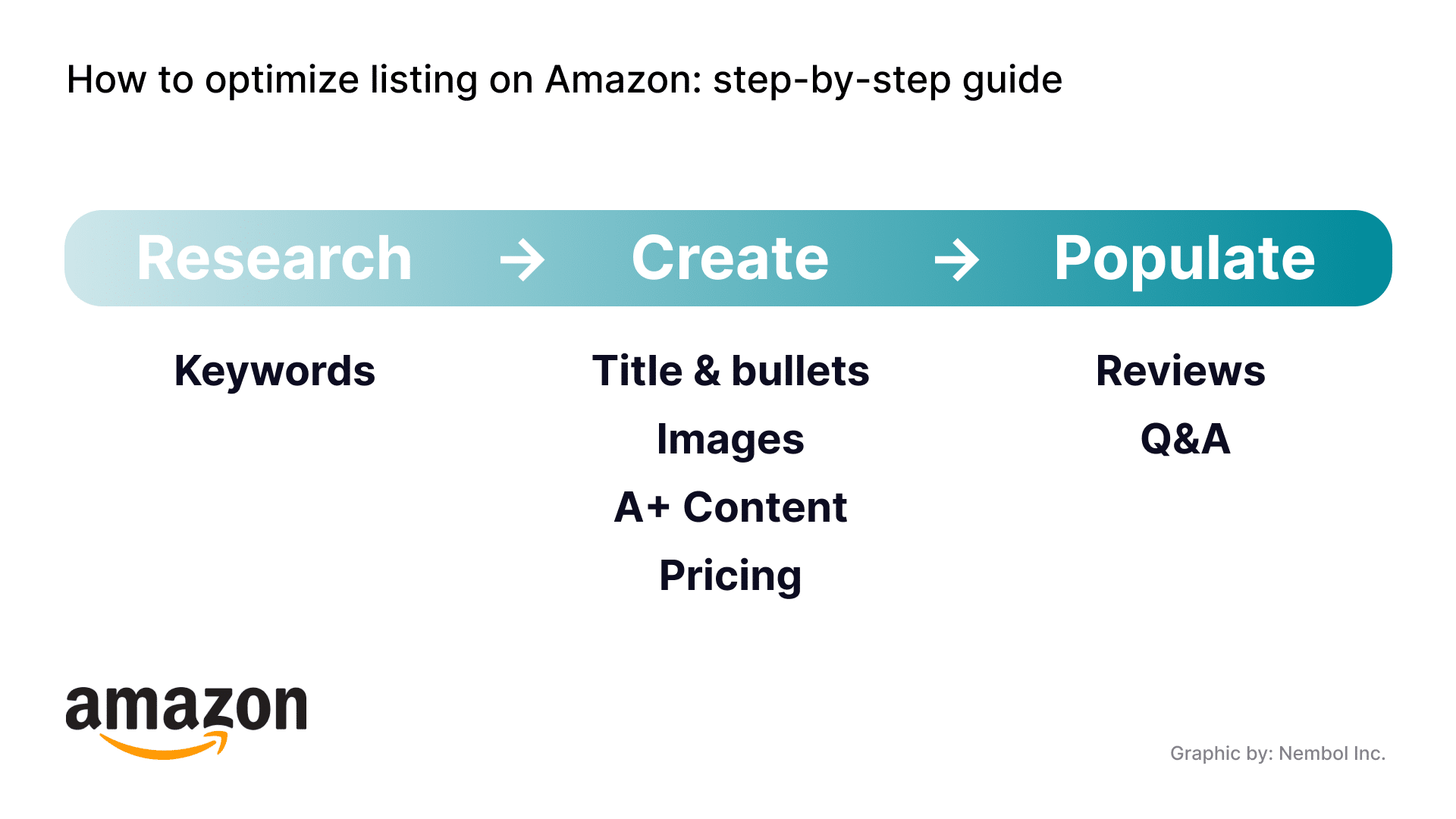
Here’s a step-by-step guide on how to proceed with optimizing your listings.
How to write an Amazon listing title
Step 1: Craft a title that includes the right key information, such as the brand, the product type, and its most distinctive attribute. Be concise, accurate, and buyer‑friendly.
The title of your Amazon listing is one of the most visible elements in search results and often shapes a buyer’s first impression of your product.
Because of this, Amazon has updated its policies to ensure titles are not only searchable but also meet the following requirements:
- Clear
- Trustworthy for shoppers
- Shorter
- More consistent
- Free of unnecessary characters or repetition
A good title balances relevance and readability. It should reflect the essential identity of your product in a way that matches how real customers search, while avoiding clutter that can confuse buyers or even reduce their confidence in your offer.
According to Amazon’s updated policy 2026, for most categories titles should:
- Stay within a reasonable length (generally under 200 characters)
- Avoid redundancy
- Exclude decorative symbols or non-standard characters
- Prioritize the most important details in this order: Brand → Flavor/Style → Product Type → Key Attribute → Color → Size/Pack Count → Model Number
- Include size and color only in child ASIN titles, not in parent ASIN titles
- Use numerals instead of spelling out numbers
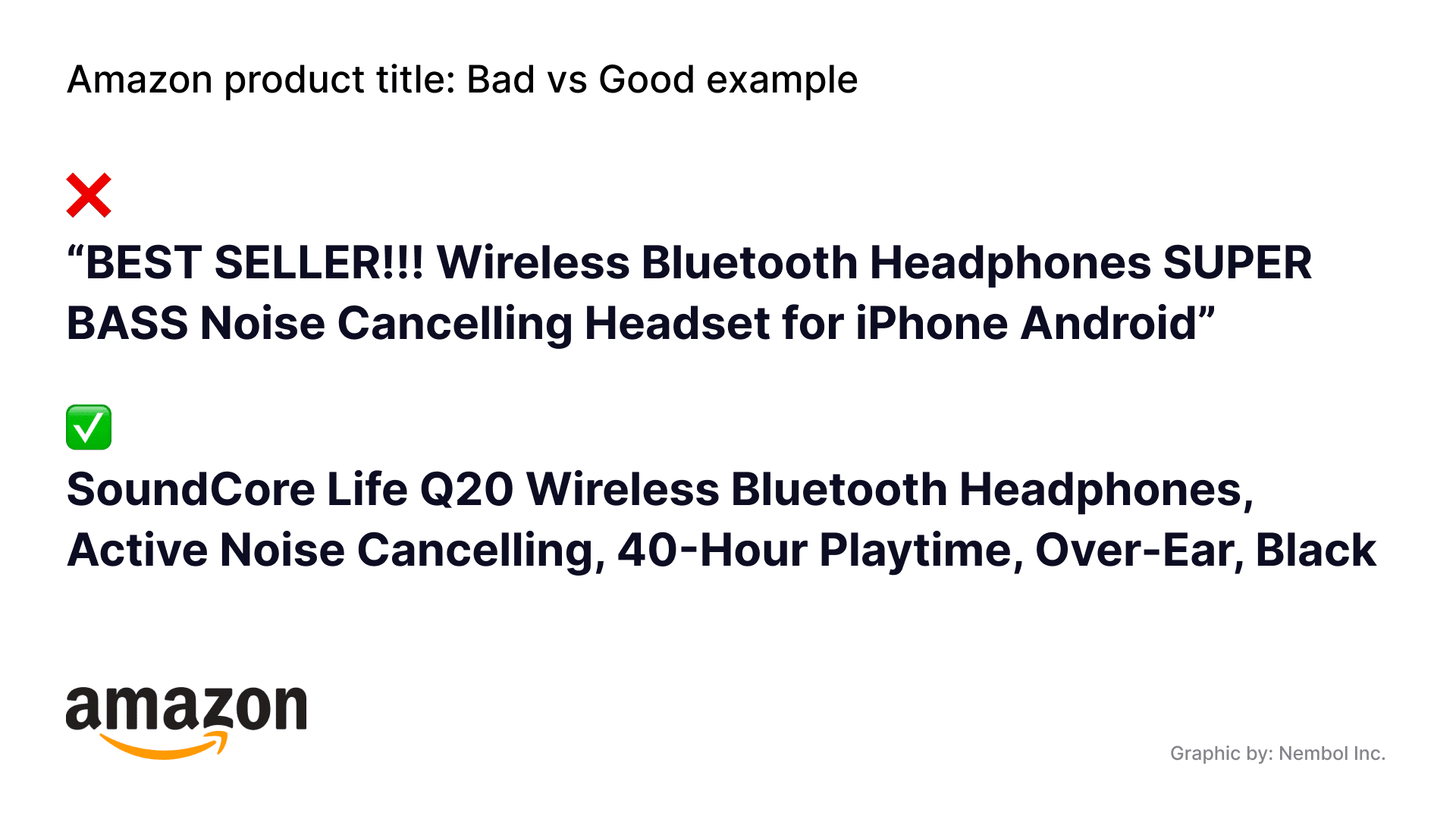
- Do not include opinion-based phrases or marketing claims like “Best Seller” or “Hot Item”
- Capitalize the first letter of each significant word, leaving prepositions, conjunctions, and articles in lowercase. Avoid all caps or all lowercase
- Measurements and quantities can be abbreviated (e.g., cm, in, oz, kg)
- Provide model numbers when relevant, particularly for technical or electronic products.
By following Amazon’s title rules you not only stay compliant, but also increase the chances that a shopper stops scrolling and clicks on your product.
See the picture below for examples of bad and good product title.
How to write an Amazon description
Step 2: Write a description that is informative, easy to follow, and prioritizes details that help customers visualize using the product in real life.
Description field is where you justify the decision to buy, giving shoppers clear, detailed information so they can confidently choose your product over others.
Amazon’s guidelines make a few key expectations clear.
- The description should use complete sentences and rich language, providing a deeper look at what the product is, what it does, and why it matters to the shopper.
- Keep the language simple, factual, and free from anything that could violate Amazon’s policies (such as seller-specific details, pricing, or promotional claims).
- A strong description not only list features, but answers practical buyer questions like materials, dimensions, usage scenarios, and care instructions.
- It also sets realistic expectations, which can reduce returns and negative feedback because buyers know what to expect.
In this comprehensive guide we’ve covered how to write an effective Amazon product description and highlighted the importance of bullet points in presenting key product attributes and benefits clearly.
How does Amazon A+ content work
Step 3: Enhance your listing with A+ Content, which lets you use richer visuals, layouts, and storytelling to highlight product features, showcase your brand, and create a more engaging shopping experience
A+ Content is an extension of the listing optimization process. This feature allows sellers to go beyond the basic text and images of a standard listing, offering enhanced layouts, rich visuals, and storytelling elements that make it easier for shoppers to understand the product’s value and benefits.
There are three main types of A+ Content:
- Basic A+ Content: A step up from a standard listing, with images and formatted text that highlight features and benefits.
- Premium A+ Content: Includes more engaging elements like larger images, embedded videos, interactive hotspots, and advanced modules that create a richer shopping experience.
- Brand Story: Allows you to weave your brand’s mission and values into the listing, often with links that can drive traffic to your Amazon Brand Store and other catalog products.
To use A+ Content, you typically need a Professional selling plan and your brand must be enrolled in the Amazon Brand Registry, which itself requires a registered trademark or equivalent documentation.
A+ Content isn’t automatically available to all sellers, if your brand isn’t registered, you’ll still have your standard product description and images, but you won’t unlock the enhanced layout options.
One important nuance is that if an ASIN already has A+ Content contributed by a retail vendor on Amazon, you may not be able to add or edit your own branded A+ Content for that same ASIN. This is because Amazon prioritizes the vendor’s contribution to avoid conflicting content on a single product page.
What are the best practices for Amazon listing images
Step 4: Optimize product images by using high-quality visuals that accurately represent the product, comply with Amazon’s standards, and include multiple angles, close-ups, lifestyle shots, and informative infographics to help shoppers understand and trust your product.
Images are among the most powerful conversion levers. A shopper’s first interaction with a product is usually visual. If those visuals don’t meet Amazon’s standards or fail to clearly communicate what the product is, you risk losing the sale before the buyer even reads the title or description.
Amazon enforces strict image requirements to ensure consistency, clarity, and trust across its marketplace. Listings that don’t comply can be suppressed, meaning they won’t appear in search results until corrected.
The main image is especially important because it appears in search results and is often the first thing a shopper notices. To keep listings compliant and effective, Amazon’s main image guidelines include:
-
Every listing must include at least one compliant product image on the detail page.
-
Main images must accurately represent the product and be of professional quality and clarity.
-
The background of the main image must be pure white (RGB 255,255,255).
-
The product should occupy a significant portion of the frame (typically at least 85%).
-
Text, logos, watermarks, borders, or other graphics are not allowed on the main image.
-
Accessories not included in the sale, props, or packaging elements shouldn’t appear unless they are part of the product itself.
Technical specifications (as of 2026) ensure images are clear and zoom-friendly:
-
Image files must be in accepted formats: JPEG (preferred), TIFF, PNG, or non-animated GIF.
-
The longest side of an image should be between 500 and 10,000 pixels, with at least 1,000 pixels recommended to enable zoom functionality.
-
Images must be sharp and free of pixelation or jagged edges.

Successful sellers typically include a mix of images:
-
Multiple angles showing size and proportions
-
Close-up shots highlighting texture or functional details
-
Contextual or lifestyle images demonstrating real-world use and benefits
-
Infographics (usually in secondary images) emphasizing dimensions or unique selling points
What is Amazon Q&A
Step 5: Use the Q&A section to identify gaps in your listing, answer customer questions to address real buyer concerns and boost confidence.
The Questions & Answers section on Amazon is more than a forum for shopper inquiries—it’s a powerful tool that can influence listing performance.
Potential buyers use this section to ask specific questions about a product’s features, usage, compatibility, or other details not fully covered in the title, description, or bullet points. Answers from previous customers, sellers, or manufacturers provide practical guidance that helps shoppers make confident purchasing decisions.
Amazon has recently introduced Rufus, a generative AI assistant that can answer customer questions directly using product information, reviews, and existing Q&A. Rufus doesn’t replace the traditional Q&A section but enhances it, providing instant, natural-language answers while highlighting areas where the listing could be improved.
For example, if Rufus repeatedly fields questions about a feature not described in the listing, this indicates a potential gap in the product detail page that could be updated. By monitoring and leveraging both customer-submitted questions and AI-generated insights, sellers can refine their titles, descriptions, and bullet points to address real buyer concerns.
Proactively managing Q&A and updating listings based on common queries not only increases buyer confidence but also strengthens the overall effectiveness of your product listings.
What is Amazon pricing optimization
Step 6: Optimize pricing strategically by considering competitor prices, seasonal trends, supply and demand, fulfillment costs, and psychological price points; use dynamic pricing and automation tools to adjust in real time, protect margins, and improve visibility, conversions, and Buy Box performance.
Pricing optimization on Amazon is more than setting a competitive number, it’s a strategic lever that affects visibility, conversions, and profitability.
Every product on Amazon is competing in a highly dynamic marketplace, where customers compare offers not only by features but also by price, shipping costs, and perceived value.
A carefully optimized price can influence who wins the Buy Box, the prominent “Add to Cart / Buy Now” option that drives the majority of sales, while also protecting margins and maintaining long-term profitability.
Effective pricing optimization considers multiple factors:
- Competitor pricing
- Seasonal trends
- Supply and demand fluctuations
- Fulfillment costs, and even the psychological impact of price points (for example, $19.99 versus $20).
A carefully optimized price helps a product stand out in search results and encourages clicks, while still protecting margins and maintaining long-term profitability.
Dynamic pricing is central to staying competitive. Prices should not be static; instead, sellers must respond to changes in the market in real time, such as competitor adjustments, stock levels, or shifts in demand.
This is especially important for high-traffic categories where small price differences can determine whether a product wins or loses visibility.
A third-party tool like Nembol simplifies this process. Through features such as price bulk edit and automated pricing rules, sellers can adjust multiple Amazon products at once or set conditional rules that adapt prices according to percentage changes or rounding thresholds.
This approach reduces manual work, ensures consistency, and makes it easier to maintain a competitive edge while aligning with overall listing optimization strategies.
Adjust your prices in bulk, run promotions, and apply a .99 psychological pricing threshold.
Try Nembol for free: enjoy a 14-day trial.
No credit card required.

How important are reviews on Amazon
Step 7: Build trust and credibility by encouraging authentic customer reviews, monitoring and responding to feedback, and leveraging Amazon-approved tools and programs—while strictly avoiding any incentivization or manipulation—to strengthen social proof, boost conversions, and support overall listing performance.
Trust, reputation, and credibility — key elements of a successful product listing on Amazon. Customer reviews play a central role in establishing all three.
Reviews provide social proof that helps shoppers decide whether a product meets their expectations.
Positive reviews:
- Signal trust and reliability to new buyers
- Build confidence and encourage conversions
- Show that the product is valued by the community
The quantity and quality of reviews matter: a larger number of authentic reviews enhances perceived credibility, while few or negative reviews can slow sales and reduce the effectiveness of other listing optimization efforts.
Amazon provides sellers with tools in Seller Central to monitor, respond to, and learn from reviews, helping them refine both the product and the listing content.
Here are different methods for obtaining reviews:
Method 1: safely and in line with Amazon’s policies by encouraging genuine feedback from verified buyers.
Method 2: sending polite follow-up emails through Amazon’s Buyer-Seller Messaging system.
Method 3: enrolling in the Amazon “Request a Review” button feature for individual orders.
Method 4: participating in programs like Amazon Vine where Amazon invites trusted reviewers to share their experience.
Importantly, sellers must avoid incentivizing reviews or influencing the content, as this is strictly prohibited and can lead to severe enforcement actions.
Amazon takes the integrity of reviews seriously. The platform strictly prohibits manipulation, including fake, misleading, or incentivized reviews, and can take strong enforcement actions against violators.
These actions include suspending or terminating selling privileges, removing product reviews, delisting products permanently, withholding payments, pursuing legal action, and, in some cases, publicly disclosing the seller’s identity.
What is the variation limit on Amazon listings
Step 8: Group related SKUs under a single parent ASIN to improve visibility, simplify the shopping experience, and boost conversions, using tools like Nembol to manage variations efficiently.
Variations are a strategic factor of listing optimization because they directly impact visibility, customer experience, and conversion rates.
Amazon allows a maximum of 2,000 child ASINs to be displayed under a single parent ASIN on the product detail page. While it is technically possible to create more, any additional child ASINs beyond this threshold will not be shown to customers, potentially reducing their visibility and sales potential.
From a listing optimization perspective, this means sellers must focus on clarity, relevance, and usability when setting up variations. Grouping only truly related SKUs and avoiding overly large or irrelevant sets ensures that shoppers can easily navigate the options, find what they want, and make a purchase, all of which support better search performance and higher conversion rates.
Share and Sync your Amazon
Listings Multichannel
Your listings are now optimized.
With Nembol, you can cross-list them on eBay, TikTok Shop, Shopify, Etsy, WooCommerce, Meta Commerce.
Sync inventory and prices, edit everything from one dashboard, and keep your listings consistent across all sales channels.
