

Last update Sep 16, 2026
What is item location on eBay?
Item location on eBay is the postal code, city and country your item ships from, and you can change it in two places. On a single listing, edit the location in the shipping section of the listing form. For everything you list in future, go to Account settings → Addresses and update the address there. Changing the default does not touch listings that are already live.
eBay requires the location to be accurate and consistent across the title, description and item specifics, and the tracking number you upload after a sale must match it. Listings that fail those checks are rejected when you publish, or removed later.
Item location is an accurate statement of where your item is shipped from.
eBay official Item Location policy page states:
“To make sure buyers have a clear understanding of shipping charges and delivery times, sellers must provide accurate information in their listings about where their item will be shipped from.”
As an eBay seller, this is the most important thing you need to keep in mind: you have to correctly inform your customers about where the goods are shipped from.
What is eBay Item Location Policy?
This is what eBay asks you as a seller:
- You have to state clear information about the item’s location. This includes postal code, city, and country;
- Your stated item location must be consistent across all areas of the listing (title, description, and item specifics)
- The orders’ tracking numbers must always match the shipping location provided.
How can I change item location on eBay?
Item location is a potential source of issues and errors when bulk-listing on eBay with Nembol.
Item location must be consistent with your Business Policies, otherwise eBay will reject your listings and you won’t be able to sell your items.
How to change item location on each listing
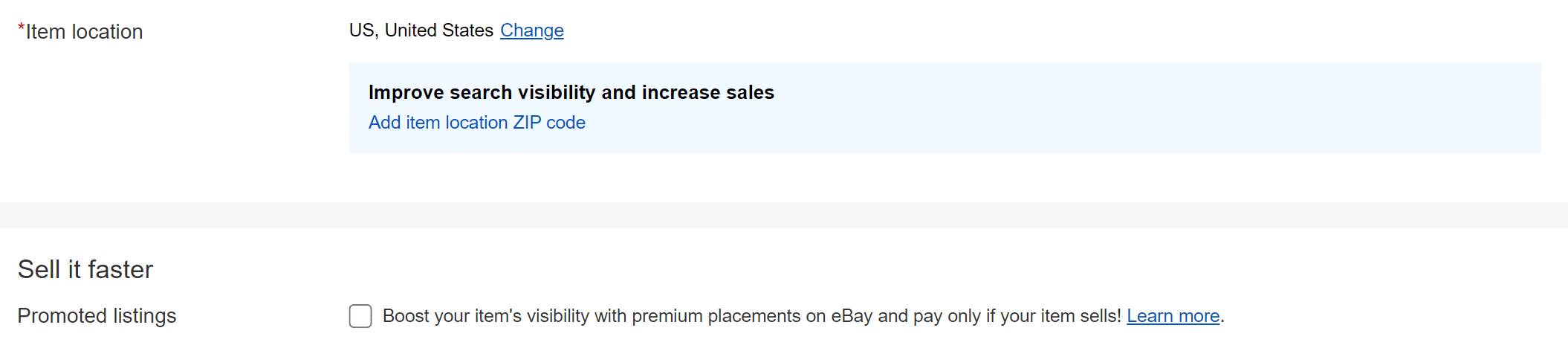
When you create a new listing, you can choose the item location at the bottom of the page, just before the “Sell if faster” block.
There, you can state each item’s “ship from” location.
Important! You can assign in bulk an item location to your listings using Nembol.
eBay: How to change default item location
To use an item location as a default setting, you should:
- Go to eBay and click on “Hi -your username-” in the upper left corner.
- Click on the “Account settings ” and select “Addresses.”
- Make any required changes to the address information. Your default location for future listing publication will be changed according to your new address.
Discover exclusive content, insider tips by subscribing to our newsletter. It’s quick, easy, and free! Join now and get a 10% discount!
By entering your email address, you accept our Privacy Policy and Terms of Use. Totally free. Unsubscribe at any time.
How to avoid common location errors due to eBay business policies
Sometimes, when bulk listing on eBay with Nembol, you get this error:
“Your item Location indicates that your item is in the United States, but you’ve chosen a shipping service that ships from outside the US. In order for your listing to be clear, please go back and edit the item location or the shipping service to make sure that they are accurate. For more information, see our Item location misrepresentation policy.”
This is quite common among new users and fresh eBay accounts. The reason is due to inconsistency between stated Item Location and Business Policies.
Why does eBay say my item location is invalid?
Your stated item location contradicts something else in the listing. eBay checks the postal code, city and country against your shipping service and business policies, and rejects the listing when they disagree. The usual case is a US item location paired with a shipping service that dispatches from outside the US.
How to fix the eBay item location error
- Open the listing, or your Nembol eBay publish settings if you are bulk listing.
- Check the item location: postal code, city and country.
- Check the shipping business policy and confirm it dispatches from that same country.
- Set both to the same country, save, and publish again.
If the listing is already live, revise it and edit the ship-from address. You cannot revise the location while an auction has bids or active Best Offers, or in the final 12 hours before it ends — wait for the listing to end or resolve the offers, then relist.
In this guide, we will go through how to change item location only. You can read our dedicated guides on eBay Business Policy management here:
Read more: most common errors while setting business policies
How to state item location on Nembol
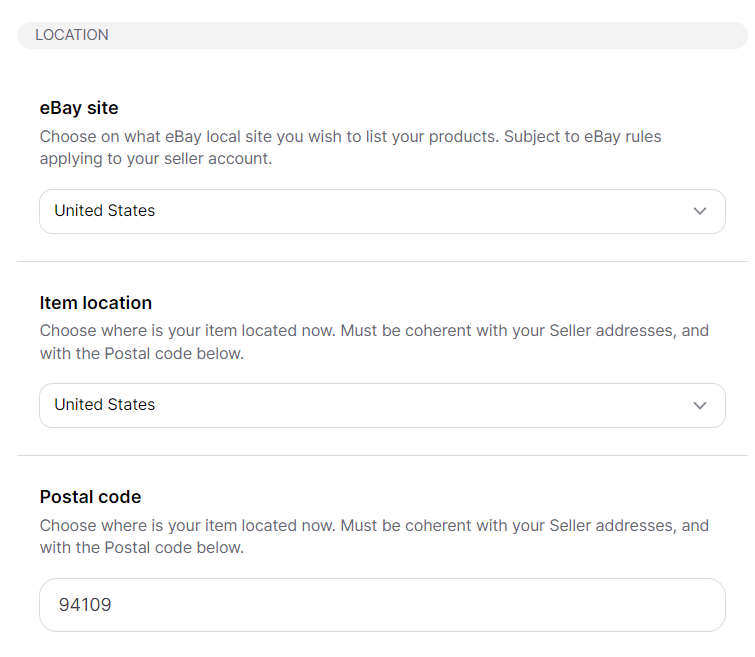
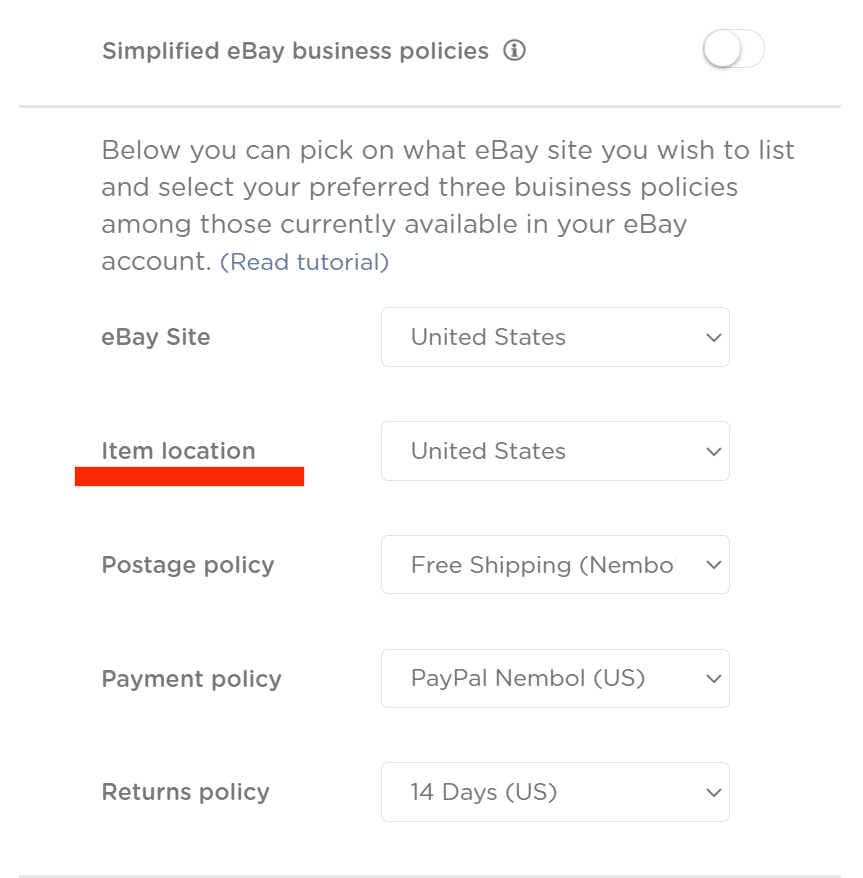
You can choose a default item location in your Nembol settings for all listings that you will post on eBay via Nembol.
- Under “Publish settings”, in Nembol’s eBay settings, you have to set your business policies and type your postal code (mandatory only to use calculated shipping). Choose the item location from the dropdown menu, together with the shipping policy, returns policy, and payment policy (see screenshot below).
From now on, Nembol will publish on eBay all your products using this item location.
This setting is not retroactive, meaning that if you change the item location in your Nembol settings, Nembol will not modify previously published items.
Try Nembol for free: enjoy a 14-day trial
No credit card required
Frequently Asked Questions
What does item location mean on eBay?
How to set item location on eBay?
Go to eBay, click on “Hi – [your username]” in the upper left corner, then “Account settings.” Select “Addresses” to set or update your eBay location by editing the address information as needed.
How to change item location for each listing on eBay?
On eBay, you can change item location at the bottom of the listing form, before “Promote your listing.” Enter the address there. Nembol lets you bulk-set ship-from ZIPs, saving time and avoiding errors.
How to change location on eBay?
To change the location on a single listing, revise it and edit the ship-from address in the shipping section. To change it for all future listings, go to Account settings → Addresses. If you are moving your business to a different eBay site — for tariff reasons, for example — see our guide to moving your listings across eBay international sites.
Can I change the item location after a listing is live?
Usually yes: revise the listing and edit the location. You cannot revise it while an auction has bids or active Best Offers, or in the final 12 hours before it ends. In that case wait for the listing to finish or resolve the offers, then relist.
Does changing my default item location update my existing listings?
No. The default applies only to listings created after the change. Live listings keep the location they were published with and have to be revised, individually or in bulk.
Can I have more than one item location?
Yes. The default in Account settings covers new listings, but each listing can carry its own ship-from location — which is what you need when you hold stock in more than one place.
What happens if my eBay item location is wrong?
eBay lists removing the listing, issuing a warning, and restricting activity or suspending the account. Buyers can report a mismatch, and tracking that does not match the stated location is the usual trigger.